

Building IBM Cloud Email from
capability to product
Transforming existing cloud capabilities into a cohesive email product that helps developers configure, test, send, scale, and monitor transactional email.
MY ROLE
Product strategy · Systems UX · Information architecture · Interaction design · Prototyping · Testing
Scope:
Domains · Sandbox · Email API · SMTP · Dedicated IP · Metrics
Overview
Summary
Opportunity
Capability without a product
IBM Cloud relied on an external provider for transactional email while Event Notifications was developing the underlying capabilities to support these workloads natively.
Challenge
Create a new email experience
Create a dedicated Email experience without forcing users to understand Event Notifications' underlying architecture.
Outcome
A validated product direction connecting Domains, Sandbox, Email API/SMTP, Dedicated IP and Metrics around one transactional email lifecycle.
87.5/100
UMUX
6
Participants
4
Key issues identified
Pre-launch
Usability testing
Platform context
First, understanding the platform underneath
IBM Cloud Event Notifications (EN) routes events from applications to destinations such as email, webhooks and push notifications. Underneath the Email experience, EN provides the delivery infrastructure but its model of sources, topics, subscriptions and destinations doesn’t match the simpler mental model of a developer trying to send transactional email.

How might we create an email-first experience without duplicating the underlying platform or forcing users to understand its architecture?
Competitive Landscape
Learning from products developers already use
What I carried into the design
O1
Guided, not assembled
Turn complex configuration into a clear sequence.
O2
Sandbox, not a gate
Make safe testing part of the journey, not a restriction users must escape.
O3
Visibility built in
Bring metrics and troubleshooting into the product itself.
The Opportunity
The capability existed. The product experience didn't.
While the underlying capabilities were increasingly available within Event Notifications, there was no dedicated Email experience bringing them together around the way developers actually work.
"The opportunity wasn't to recreate an external email product. It was to create the right transactional email experience for IBM Cloud."
"Send an email" hides a surprisingly complex system.
From a developer's perspective, the goal is simple:
"I need my application to send transactional email reliably."
Underneath that goal sit multiple interconnected capabilities:
Domain verification
Email API / SMTP
Security prerequisites
Sandbox testing
Dedicated IP
Metrics & troubleshooting
Users & Jobs to Be Done
Two audiences. One shared need for reliability.
Application Developers - Configure & send
"Help me integrate transactional email into my application without making me learn an entire notification platform."
API / SMTP integration
Domains
Testing
Recipients
SRE / Operations - Monitor & troubleshoot.
"Help me know whether email infrastructure is healthy and what to do when it isn't."
Reliability
Deliverability
Metrics
Troubleshooting
Product Strategy
I stopped thinking in features and started thinking in lifecycle.
This lifecycle became the foundation for the product architecture and the decisions that followed.
Design Principles
Three principles that shaped every decision.
System Architecture
One Email experience. One underlying platform.
A dedicated Email experience couldn't become a second disconnected system. Email still relies on Event Notifications underneath.
Where possible, supporting resources are created or connected automatically while remaining reflected across the broader platform.
"The goal wasn't to hide the system. It was to prevent users from having to configure architecture unrelated to their immediate goal."
Domains
Production email starts with establishing trust.
Before users can send production email, their domain must be verified.
Design challenge
How do we keep users oriented when parts of the journey happen outside the product or require time to complete?

SPF
DKIM
Authorization

Sandbox
What if users aren't ready for production yet?
A developer evaluating the service shouldn't need to complete every production prerequisite just to understand whether the product works for them.
Design decision:
introduced Sandbox as a first-class path inside the same configuration experience.


Progressive Commitment
Sandbox shouldn't become a dead end.
The Update action opens the existing configuration pre-filled, allowing the user to replace the Sandbox domain with a verified production domain and make only the changes required for production.
Design decision:
"Let users progressively commit instead of forcing them to start over."


Send
One goal. Two technical mental models.
Forcing Email API and SMTP into identical workflows would simplify the interface while making the product harder to understand. The two paths share a product destination but their configuration differs.


Scale
Dedicated IP
Scaling email introduced a different kind of complexity. High-volume senders can use Dedicated IPs to manage their sending infrastructure. The UX challenge was making infrastructure states, warm-up and IP management understandable without exposing unnecessary backend complexity.

Observe
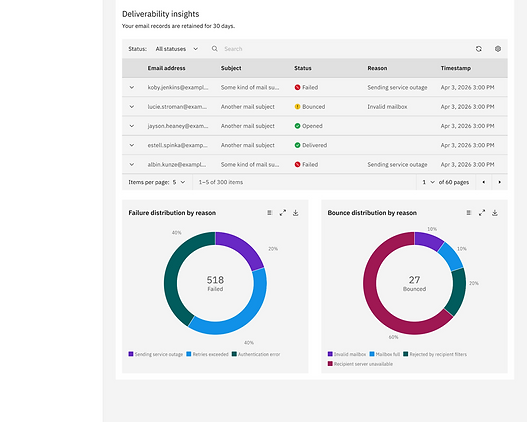
Metrics
Once users start sending, the next question is: "What happened to my email?" Observability should be part of the email experience not a separate reporting tool bolted on afterwards.

Scale
Testing the decisions before launch.
Four major product and design decisions were taken into pre-launch usability testing.
Pre-launch usability validation not production analytics. Testing evaluated whether users understood the product model, could complete critical workflows, and knew what to do next.
Outcome
Ready for launch
Four major product and design decisions were taken into pre-launch usability testing.
The final experience transformed how the underlying capabilities are presented to users:
Platform architecture → Email-first mental model
Fragmented capabilities → Connected lifecycle
Production-first setup → Sandbox-first progression
Opaque system states → Clear operational feedback
Sending only → Setup + Test + Send + Scale + Observe
Setup success
87%
% of users successfully completed production setup.
Sandbox → Production
72%
Make safe testing part of the journey, not a restriction users must escape.
Time to first email
8 min
median time from starting setup to successfully sending an email.
Phase 2
Exploring AI as a contextual intelligence layer
Not shipped - Once the core lifecycle was unified, I explored where AI could reduce the next layer of friction: understanding what is happening across interconnected configurations.
Where does AI actually add value?
Not all complexity is the same kind of complexity. The first question was whether a problem already had a known answer inside the system.
Applying the model to delivery troubleshooting
I used a delivery anomaly to explore how this model could work inside the existing Metrics experience. The delivery troubleshooting flow is one application of the approach not a separate AI feature.
Detect
Operational Signal
The existing metrics experience surfaces a spike in bounced emails and identifies the domain contributing most to the increase.

What I explored
I used this operational signal as the starting point for the AI exploration. Instead of asking users to investigate delivery metrics, domain configuration and authentication separately, I explored how AI could help connect that context.
Understand
Contextual Investigation
The investigation carries the affected domain and time range into the AI experience, then reviews delivery metrics, configuration and authentication information together.

Reducing effort
The exploration tests whether AI could reduce the manual work of moving across different parts of the product to diagnose a delivery issue.
Act
Structured diagnosis
The exploration moves from investigation to a structured diagnosis bringing the relevant system signals, a likely explanation and a recommended next step into one place.

Keeping users in control
AI can help interpret the available signals and recommend what to check next, but it doesn't modify the configuration. The user reviews the recommendation and continues through the existing domain configuration workflow.
The opportunity wasn't to add AI to Email. It was to identify where intelligence could remove interpretation work without removing user control.
Reflection
What this project taught me
Not shipped - Once the core lifecycle was unified, I explored where AI could reduce the next layer of friction: understanding what is happening across interconnected configurations.
O1
Simplifying the product didn't require simplifying the underlying architecture. The work was creating a mental model that matched user intent not removing the platform infrastructure that made the product possible.
O2
Progressive disclosure reduced cognitive load without hiding important system context. The Sandbox path, contextual state indicators and SMTP prerequisite warnings each surfaced complexity at the moment it became relevant not before.
O3
Some dependencies couldn't be redesigned away. Designing across interconnected IBM Cloud products meant deciding which complexity belonged to the user, which belonged to the platform, and when each needed to be visible.
The design challenge wasn't simply adding email capabilities to IBM Cloud. It was turning interconnected infrastructure into a product developers could understand, trust and operate.
To experience this feature - https://www.ibm.com/solutions/cloud